If you are a customer, you don't need this page. Use 10.0.0.1 to pause your time, as shown in the steps to pause your Piso WiFi.
Customer portal vs the 10.0.0.1 admin page
The customer portal at 10.0.0.1 is where people insert coins, enter vouchers and pause. The 10.0.0.1 admin page is the owner's control panel, where rates, vouchers, pause rules and the admin password live.
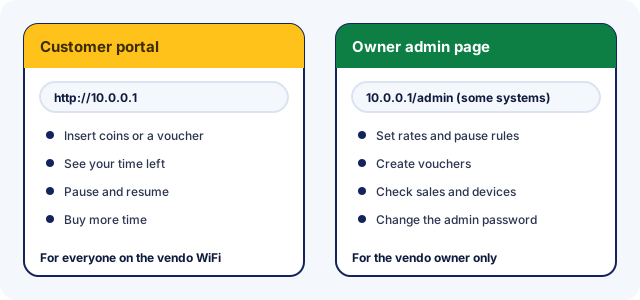
Both often sit on the same vendo, so the address differs only by the path. That's why searches mix them up. A customer who lands on an admin login screen should go back to the main address.
How to open the 10.0.0.1 admin page
To open the 10.0.0.1 admin page, connect a phone or laptop to the vendo's network, type http://10.0.0.1/admin and sign in with the owner account.
- Join the vendo's WiFi, or plug a laptop into its network, and turn mobile data off.
- Type
http://10.0.0.1/admininto the browser's address bar. - Sign in with your admin username and password, then change any default password straight away.
If the owner changed the vendo's network address, the admin page moves with it. On AdoPiSoft, for example, 10.0.0.1 is the default rather than a fixed address.
Admin page by Piso WiFi system
| System | Admin page | Documented by |
|---|---|---|
| AdoPiSoft | 10.0.0.1/admin | AdoPiSoft guide, checked Nov 2026 |
| PisoFi | 10.0.0.1/admin | PisoFi build guide (2020) |
| LPB | 10.0.0.1/admin | Reported by other Piso WiFi guides; LPB's site gives no admin address |
| JuanFi | A setup panel reached through a separate setup WiFi | JuanFi README |
System guides for owners: AdoPiSoft owner settings, LPB owner notes and the PisoFi setup details.
Piso WiFi default admin login by system
Each system ships with a default admin login, and most makers publish it in their setup guides. Use it once to sign in, then change it straight away. Anyone who knows the default can otherwise open your admin page.
| System | Where | Username | Password |
|---|---|---|---|
| LPB Piso WiFi | 10.0.0.1/admin | admin | 123456789Source: other Piso WiFi guides. LPB doesn't publish this login itself. Installers often change it. |
| AdoPiSoft | 10.0.0.1/admin | admin | adminSource: adopisoft.com. Change both under Account Details after your first login. |
| PisoFi | 10.0.0.1/admin | administrator | admin12345Source: pisofiph.com. From PisoFi's March 2020 build guide. |
| JuanFi | 172.217.28.1/login on the "JuanFi Setup" WiFi | admin | adminSource: github.com. From the JuanFi developer's setup guide on GitHub. |
Only sign in to a vendo you own or manage. Opening someone else's admin page without permission is unauthorised access, even with a public default login.
Router and MikroTik logins
Some vendos also have a router with its own login. That login opens the router's settings, not the vendo software.
| System | Where | Username | Password |
|---|---|---|---|
| MikroTik HotSpot | the router (WebFig, WinBox) | admin | none (blank)Source: help.mikrotik.com. Some newer MikroTik devices ship with a password printed on the label instead. |
| TP-Link | tplinkwifi.net | admin | adminSource: tp-link.com. Older models only. Newer models ask you to create a password on first login. |
JuanFi vendos also use a MikroTik user so the vendo board can talk to the router. JuanFi's guide asks owners to change it, along with the operator account password.
| System | Where | Username | Password |
|---|---|---|---|
| JuanFi | pisonet | abc123Source: github.com. The MikroTik user the vendo board uses to talk to the router. |
Piso WiFi pause time admin settings: turning pause on
Piso WiFi pause time admin settings live in the vendo software's admin page, and each system names them differently. If customers can't see a Pause button, start here.
AdoPiSoft
- Session settings set the number of pauses per session and when a session expires. AdoPiSoft's example gives 10 pauses for 1 to 2 hours of time.
- Each WiFi device can be allowed or blocked from pausing, and the default portal hides Pause when it isn't allowed.
- Each voucher has an Allow Pause box. Without it, voucher time runs continuously.
- The captive-portal theme settings can show or hide the voucher form and the GCash button.
PisoFi
PisoFi puts pause under Portal > Wifi Options. Owners can switch pause on or off and set the maximum time a user may stay paused. They can also set how long paused time stays valid, and pause or resume users automatically when they leave or rejoin the WiFi.
JuanFi and LPB
JuanFi supports pause expiration, and LPB's 2019 template had a version that switched off pausing for voucher users. Neither publishes the current menu for these settings, so check your installer's notes or the software's own community.
Keep your Piso WiFi admin login safe
Your admin page controls your income, so treat its password like a bank PIN. Default logins are public, as the table above shows, so change yours on first login.
- Use a long password that you don't use anywhere else.
- Never sign in to the admin page on a customer's phone, and sign out when you finish.
- Don't share the login with helpers; give them vouchers to sell instead.
- Keep the vendo software updated, because updates fix security problems.
- If you bought a used vendo, change every password before you open for business.
Forgot your Piso WiFi admin password?
Try the default login first, in case nobody changed it. If that fails, contact whoever installed your vendo, then the software maker. LPB, for example, points support questions to its Facebook page.
- MikroTik says a forgotten router password can't be recovered. You have to reset the configuration or reinstall the system.
- TP-Link says a forgotten router login needs a reset to factory defaults.
- AdoPiSoft recommends backing up your data and portal before reflashing or replacing the SD card.
We found no official reset steps for the vendo software itself, so we don't publish any. A reset done the wrong way can erase your rates, vouchers and sales records.
10.0.0.1 admin on home routers
Some home internet gateways, such as Xfinity's, also use http://10.0.0.1 for their settings page. That page belongs to the router maker, not to a Piso WiFi system, and its login is in the router's own documentation. The note on home routers covers the difference.
10.0.0.1 admin FAQ
What is the 10.0.0.1 admin password?
It depends on the system. LPB vendos are widely reported to use admin and 123456789, AdoPiSoft uses admin and admin, and PisoFi uses administrator and admin12345. The default login table lists them all with sources. Installers often change them.
Is 10.0.0.0.1/admin the same as 10.0.0.1/admin?
It's a typo of it. 10.0.0.0.1 has an extra 0, so the browser searches instead of opening the page. Type http://10.0.0.1/admin exactly.
Can customers open 10.0.0.1/admin?
Anyone on the vendo WiFi may reach the login screen, but only the owner's account gets past it. Customers need nothing there: insert coins, vouchers and Pause are all on the main portal.
Why won't 10.0.0.1/admin open?
Check that your device is on the vendo's network with mobile data off. Not every system uses /admin: JuanFi vendos are set up through a separate setup WiFi, and MikroTik routers have their own login.
Where do I change pause settings?
In the admin page. AdoPiSoft owners set pause limits and session expiry in its session settings, and PisoFi owners switch pause on or off under Portal > Wifi Options.
How do I change the Piso WiFi admin password?
Sign in to the admin page and open its account or system settings, where the password lives. Menu names differ by system, so follow your software maker's guide.
What if the default login doesn't work?
Your installer or a previous owner probably changed it. Ask them first. If nobody knows it, follow the steps for a forgotten admin password.
Can I manage my vendo from my phone?
Yes, on the same WiFi you can open 10.0.0.1/admin in your phone's browser. AdoPiSoft and JuanFi also link their own owner apps on Google Play for remote management.
Can I see who is connected to my vendo?
On AdoPiSoft, yes. The Dashboard shows online customers and connected users without a session, and Wifi Devices lists each device. Other systems show similar lists under their own menu names.
What is the Piso WiFi password for customers?
Customers don't need the admin password. If the vendo's WiFi network itself asks for a password, the owner usually posts it on the machine or will tell you.