What Piso WiFi login means
Piso WiFi login is the vendo's portal page, not an account sign-in. The portal is a small web page that runs on the vendo itself. There you pay with coins or a voucher, then pause or resume your time.
Two other things are also called "login". The owner's admin page asks for a username and password. AdoPiSoft vendos can also offer optional customer accounts with a wallet, under More > My Account. Neither is needed to buy time.
How to open the Piso WiFi portal and sign in
To open the Piso WiFi portal and sign in, join the vendo's WiFi and let your phone open the sign-in screen, or type http://10.0.0.1 yourself.
- Connect to the vendo's network in WiFi settings.
- On Android, tap the "Sign in to Wi-Fi network" notification. On iPhone, wait for the login screen that opens by itself.
- If neither appears, open your browser and type
http://10.0.0.1.
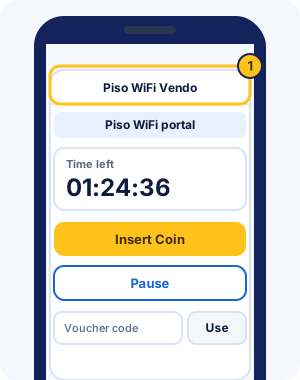
To skip the typing next time, save the portal as a one-tap pause shortcut on your phone.
What each part of the portal does
Most Piso WiFi portals share four parts: your time, an Insert Coin button, a Pause button and a voucher box. Owners choose the colours and labels, so yours may look different.
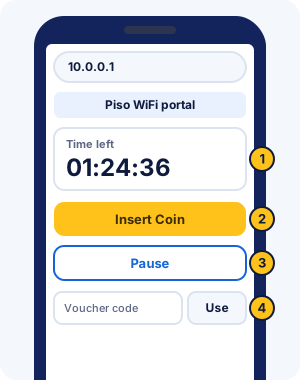
- Time left shows how much internet time you have, and changes to a paused state when you pause.
- Insert Coin tells the vendo to accept coins; drop them in the slot, then confirm on the screen.
- Pause stops your time. The same button usually becomes Resume, or Connect on AdoPiSoft.
- The voucher box takes a code you bought from the owner.
Some portals add more buttons, such as rates or Buy Voucher. AdoPiSoft vendos can show GCash, JuanFi's standard portal has EXTEND TIME, and LPB's 2019 template had "Convert time to voucher".
Piso WiFi pause time login: pausing after you log in
There's no separate Piso WiFi pause time log in: it's the same portal page, not a separate account. Once your time is running, the Pause button sits beside it; tap it before you leave, and tap Resume when you're back.
If the portal shows its sign-in page again after a pause, open it, check your saved time and tap Resume. The resume steps on the pause guide show each step.
How to log out of Piso WiFi
Most portals have no log-out button, because your time is tied to your phone rather than to an account. To stop using time, tap Pause. Closing the browser or the login screen doesn't stop your time.
- Tap Pause before you leave, and check the portal shows your time as paused.
- Turning off WiFi or walking away keeps your time running, unless the owner set the vendo to pause automatically.
- MikroTik-based vendos have a /logout page that ends your session. Ask the owner whether it keeps your remaining time before you use it.
- If you signed in to an AdoPiSoft customer account on a shared phone, sign out of the account under More > My Account.
Piso WiFi sign-in problems and fixes
Most sign-in problems come from the connection, the browser or the vendo's own limits. Find your problem below; the full troubleshooting guide has every step.
The sign-in screen doesn't appear
Your phone opens the sign-in screen only when it detects a portal. If it doesn't, type http://10.0.0.1 in your browser. Still nothing? Turn mobile data off and rejoin the vendo WiFi.
Insert Coin does nothing
The vendo may be offline, or your phone may be suspended for tapping Insert Coin without paying. AdoPiSoft owners set the number of tries and the suspension time. Wait a few minutes, then ask the owner.
Pause disappears after you log in
Pause only shows while your time is running and pausing is allowed. On AdoPiSoft's default portal, the button is hidden for sessions the owner doesn't allow to pause. Insert a coin first, then look again.
Tips for a smooth Piso WiFi login
- Join the vendo WiFi before you open the portal. It only answers on the vendo's own network, never on mobile data.
- Turn mobile data off while you log in, so your phone doesn't switch away from the vendo WiFi.
- Type
http://10.0.0.1in full, with three dots and no spaces. - Use the same phone each time, because your time belongs to the device that paid.
- Keep your phone's private WiFi address fixed for vendo networks you use often.
- Save the portal as a home-screen shortcut for pausing.
10.0.0.1/client?page=dashboard and other portal addresses
Addresses such as 10.0.0.1/client?page=dashboard, 10.0.0.1/portal.html and 10.0.0.1/home are pages some portals use. They exist only on vendos built that way, so a link someone shared may show an error on yours.
Open http://10.0.0.1 first. The vendo takes you to its own dashboard or status page from there, and a mistyped version can be checked with the 10.0.0.1 typo checker.
Portal login vs admin login
The portal is for customers; the admin login is for the vendo owner. If a page asks for an admin username and password, you've reached the owner's settings, usually at an address ending in /admin. Owners can read about it in the vendo owner admin guide.
Logging in to Piso WiFi safely
A real portal asks for coins or a voucher code, never for your email, Facebook or bank password.
Close any page on the vendo WiFi that asks for an email, social media or bank password. The portal never needs them.
A "Not secure" label beside 10.0.0.1 is normal on a local portal, because it uses plain http. Check that you're connected to the vendo's network before you tap anything.
Piso WiFi login FAQ
What is the Piso WiFi login password?
Customers don't need one on most vendos: you pay with coins or a voucher code. A password belongs to the owner's admin page, and to optional customer accounts on systems such as AdoPiSoft.
Why does the Piso WiFi login page keep coming back?
The portal shows again when your time runs out, when you pause, or when the vendo stops recognising your phone. Check your time on the portal; if it's still there, tap Resume.
Can I log in to Piso WiFi on another phone with my time?
Usually not, because time is tied to the device that paid. LPB keeps time in its cloud, and AdoPiSoft's default portal offers a passcode that syncs sessions across devices. Ask the owner what their vendo supports.
How do I log in to Piso WiFi?
Join the vendo's WiFi, open http://10.0.0.1 or the sign-in screen your phone shows, then insert coins or enter a voucher. That starts your time; no username is needed.
How do I find the Piso WiFi portal?
Connect to the vendo's network first. Most portals open by themselves or at http://10.0.0.1; MikroTik-based vendos often use 10.5.50.1 instead.
Does closing the browser log me out?
No. Your time keeps running after you close the browser or the login screen. Open the portal again and tap Pause to stop it.
Why does the portal show a security warning?
Vendo portals use plain http, so browsers mark it "Not secure" or warn before opening it. That's expected on the vendo WiFi. It's only a problem if you aren't connected to the vendo's network.
Why is the vendo admin password rejected?
The installer or a previous owner probably changed the default. The default login table lists each system's login, and the admin guide covers what to do when it fails.
Can I use Piso WiFi without paying first?
Only if the owner offers a free trial. AdoPiSoft owners can give a short trial of time or data, which shows on the portal when it's on. Otherwise you need coins or a voucher before the internet works.
What is the 10.0.0.0.1 portal?
It's a typo of 10.0.0.1 with an extra 0. The real portal address has four numbers and three dots: http://10.0.0.1.