Where your remaining Piso WiFi time shows
Your remaining Piso WiFi time shows near the top of the portal at 10.0.0.1, usually above the Insert Coin button. Reload the page to see the latest figure, because some portals only update when the page refreshes.
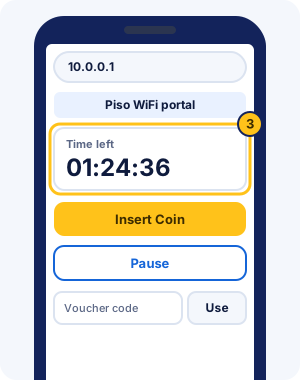
| System | Where the time shows |
|---|---|
| AdoPiSoft | The Available Sessions table, with an expiry date and the pauses left on the Pause button |
| JuanFi | The status page: Remaining Time, Expiration Time and Data Usage |
| LPB | The portal page; LPB's 2019 template labels it TIME and PAUSED TIME |
| PisoFi | The portal shows each user's time or data for the session |
| MikroTik HotSpot | The /status page, including session time left |
Sources: AdoPiSoft default theme, JuanFi template v4.3, LPB 2019 template, PisoFi features page and MikroTik documentation, checked Nov 2026.
10.0.0.1/status and 10.0.0.0.1/status
A /status page is documented for MikroTik HotSpot, the router feature JuanFi and many other vendos run on. Its default address is 10.5.50.1/status, and it shows your session statistics once you're logged in.
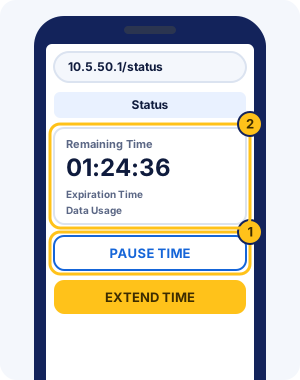
On vendos at 10.0.0.1, the main portal page already shows your time, so 10.0.0.1/status only works where the owner's system has that page. 10.0.0.0.1/status is a typo with an extra 0; type the address with four numbers.
Why your remaining time looks wrong
Remaining time usually looks wrong because the page hasn't refreshed, the vendo sees your phone as a new device, or the session expired.
- The page is old. Reload it; AdoPiSoft's portal says when it couldn't sync your time and asks you to reload.
- Your phone changed its private WiFi address, so the vendo shows a new, empty session. iPhone's Rotating setting changes the address about every two weeks on open networks.
- Your session expired. Owners can set time to expire even while paused; in AdoPiSoft's example, 2 hours of time expires 3 hours after it starts.
- You bought data, not minutes. Data-based credit drops as you use it.
- You're on a different vendo. Only LPB shares time between machines, through its cloud.
If the numbers still don't add up, show the owner the portal on your phone. They can see sessions from the admin side. For a portal that won't load at all, use the portal-not-opening troubleshooter.
Piso WiFi remaining time FAQ
How do I check my Piso WiFi balance?
Open http://10.0.0.1 while connected to the vendo WiFi. Your balance, the time or data you have left, shows near the top of the portal.
Does my time count down while paused?
No, paused time stops counting. Owners can still set paused time to expire, so don't leave it paused for days without checking the portal.
Why did my Piso WiFi time drop faster than expected?
Your time kept running while you weren't browsing because you didn't pause, or the vendo sold you data rather than minutes. Data-based credit drops as you download, not by the clock.
Can I check my remaining time on mobile data?
No. The portal is on the vendo, so you have to be on its WiFi to see your time.
What is 10.0.0.1/status?
It's a status page that some portals have. MikroTik-based vendos document one at /status on their hotspot address, often 10.5.50.1/status; on most 10.0.0.1 vendos the main page shows your time instead.
Why does my Piso WiFi time show zero?
Your time ran out or expired, your phone joined with a new private address, or you're on a different vendo. Reload the portal, then ask the owner if your paid time is missing.
Why is my remaining time different on another phone?
Each phone has its own time, because the vendo tracks the device that paid. A second phone starts at zero unless the vendo offers a way to link sessions, such as AdoPiSoft's passcode.
Does opening the portal use up my time?
No. Checking the portal costs nothing. Your time counts down while it's running and not paused, whether or not the portal is open.
What does Expiration Time mean on JuanFi?
It's when your time stops being valid, even if some is left. JuanFi supports pause expiration, so paused time can run out at that point. Use or resume your time before then.
Why does my time look frozen?
Your time may be paused, or the page hasn't refreshed. Reload the portal. If it shows paused, tap Resume to start using your time again.