Piso WiFi vendo machine and kit: what's inside
Whether you buy a kit or build a Piso WiFi machine yourself, it has five parts. You need an internet plan, a WiFi router or access point, a small computer running the vendo software, a coin slot and a box.
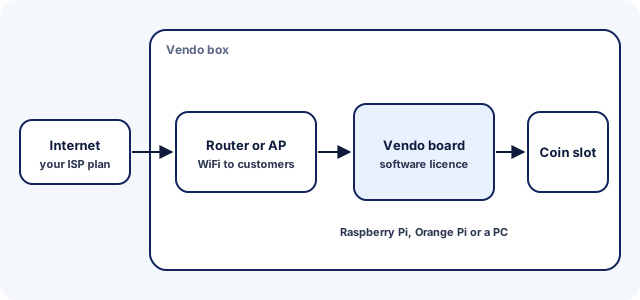
- Coin slot: takes the coins and tells the board how much was paid.
- Board or computer: runs the software, such as a Raspberry Pi, an Orange Pi or a PC, depending on the system.
- Router or access point: carries the WiFi to customers' phones.
- Software licence: unlocks the portal, rates, vouchers and pause features.
- Internet plan: the connection you share with customers.
Router or access point for Piso WiFi
Choose a router or access point that your vendo software lists as supported. AdoPiSoft names Comfast, TP-Link and Tenda access points, and LPB lists models such as the Ruijie EW1200G PRO and Linksys EA8300 among its common hardware.
How a Piso WiFi vendo is set up
Setting up a vendo follows the same order on most systems. AdoPiSoft's official guide uses these steps:
- Prepare the hardware.
- Flash the software image to an SD card.
- Wire the power adapter, coin slot and board.
- Add an access point.
- Create an AdoPiSoft account, buy a licence and activate the machine.
- Set rates, sessions and vouchers.
The software maker's own guide covers each step for your board. Once it's running, sign in to the admin page with the default admin login and change it before you open.
How many users a vendo can serve at once
The licence and your internet speed set how many customers a vendo can serve. LPB's and AdoPiSoft's Lite licences cap at 50 users, while LPB Premium and AdoPiSoft Business have no user cap.
AdoPiSoft owners can also set their own limit with WiFi Users Limit. Its Bandwidth Limiter gives each user a fixed speed, or lets everyone share one global limit. A slower line serves fewer people well, whatever the licence allows.
Extending your vendo's WiFi range
To reach customers further away, add access points rather than a stronger single router. AdoPiSoft connects extra access points through a VLAN or a USB-to-LAN setup, and lists the TP-Link EAP110 as tested for VLAN.
- Put each access point where customers sit or wait, not inside a closed cabinet.
- Mount it high and clear of metal roofing and thick concrete walls, which block WiFi.
- Use the 2.4 GHz band for distance, because it reaches further through walls than 5 GHz.
- On AdoPiSoft, turn on session cookies so customers keep their session when they move between access points.
The AdoPiSoft access point section and your own software's guide cover the wiring.
Changing your vendo's WiFi name
The network name customers see comes from your router or access point, not from the vendo software. Change it in that device's own settings. AdoPiSoft's guide does it on a TP-Link access point under Wireless > Wireless Settings, with the edit icon.
Pick a name customers can match to your machine, and print it on the box. Phones that joined the old name need to join the new one again.
Where Piso WiFi vendos are usually placed
Vendos do best where people stay a while without their own internet. Good spots include sari-sari stores, boarding houses, apartment buildings, canteens and waiting areas.
- Pick a spot with steady power and a reliable internet line.
- Keep the box dry, ventilated and in sight of someone who can watch it.
- Post your rates, pause rules and contact number on the machine.
Starlink for a Piso WiFi vendo
A vendo can run on Starlink like any other internet line, because the portal runs on the vendo, not on Starlink's equipment. The catch is Starlink's terms, which limit reselling access.
- Starlink's published consumer terms forbid reselling access unless Starlink authorises it.
- The same terms let Priority plan holders resell access as community Wi-Fi or a hotspot.
- In March 2026, The Philippine Star reported that Starlink emailed residential customers it found running Piso WiFi, citing its terms against business use.
Read the Philippine terms for your own plan in your Starlink account before you start a vendo on it. A residential plan may not allow it.
Connecting Starlink to a vendo
A vendo connects to the Starlink router the way it would to a fiber modem. An Ethernet cable runs into the vendo's internet port. Some Starlink router models need Starlink's Ethernet adapter for a wired connection. Check Starlink's support pages for your model before you buy parts.
Starlink's app can also turn off Starlink's own WiFi and hand routing to your equipment, so only your vendo's network is broadcast. Your vendo software's guide covers the rest of the network setup.
Starlink coverage in the Philippines
Starlink became available in the Philippines in February 2023. The dish needs a clear view of the sky. Check the availability map on Starlink's website for your exact address before you plan a vendo.
Starlink or fiber for a vendo?
Where a fiber or DSL line reaches your spot, compare its plan terms and price with Starlink's. Starlink suits places no wired line reaches, such as remote barangays and islands. Either way, read the reselling rules in your plan before you sell access.
Customers on a Starlink vendo pause the same way as anywhere else, as the Starlink pause time note explains.
Piso WiFi vendo price: what we can source
The only Piso WiFi vendo prices we can source are software licences, listed on each maker's own site. Kit hardware, the box and installation vary by seller and change often, so we don't quote them.
- LPB: ₱400 Lite or ₱700 Premium a year, with promo prices on its site.
- AdoPiSoft: US$16.99 Lite or US$65.99 Business.
- PisoFi: ₱1,000 for a main vendo in its 2019 FAQ.
- JuanFi: free and open source, sold only as part of a kit.
Ask any seller for an itemised quote that names the software, the licence and each hardware part.
Piso WiFi systems compared
The main Piso WiFi systems differ most in how you pay for the licence and in the pause features owners can set. All figures below come from each system's own website.
| System | Licence | Price | Pause features |
|---|---|---|---|
| LPB | Per machine, valid 1 year | Lite ₱400, Premium ₱700 (promo ₱250 / ₱500, Nov 2026) | Time kept in the LPB cloud; resume on any LPB vendo |
| AdoPiSoft | Per machine; perpetual on v5, yearly on v6 | Lite US$16.99, Business US$65.99 (Nov 2026) | Owner sets pause limits and session expiry |
| PisoFi | Main vendo licence plus sub-vendo credits; 14-day trial | ₱1,000 main, ₱300 sub vendo (2019 FAQ) | Owner sets maximum pause time and auto pause/resume |
| JuanFi | Free, open source; sold only with a kit | No licence fee | Pause expiration; runs on a MikroTik router |
Prices as listed on lpbpisowifi.com and adopisoft.com, checked Nov 2026, and in PisoFi's 2019 FAQ. LPB's 50-user limit applies to Lite; AdoPiSoft's Lite allows up to 50 connected users.
What to check before you buy a vendo kit
Before you buy a vendo kit, confirm which software it runs and whether the licence is included. Then check the hardware against that software's supported list.
- The software name and version, and whether a paid licence is included or extra.
- How long the licence lasts and whether it's tied to one machine, as LPB's licences are.
- Whether the user limit fits your spot: Lite plans on LPB and AdoPiSoft cap at 50 users.
- The board and access point models, checked against the software's own hardware list.
- Who supports you after the sale, and how to reach them.
- That you get the admin login and can change the password on day one.
We don't recommend sellers or take commissions. Compare at least two written quotes that list every part.
Buying a used vendo
A used vendo can save money, but you inherit the previous owner's settings and logins. Check these before you pay.
- Which software and version it runs, and whether the licence can move to you. LPB licences are tied to one machine and non-refundable once activated.
- That the seller hands over the admin login, so you can change it and every router password on day one.
- That the coin slot accepts each coin and adds the right time, by testing it with your own coins.
- The board, access point and power adapter, against the software's supported hardware list.
- Whether the seller kept a backup, since AdoPiSoft backups hold users, vouchers and sales records.
Legal and practical notes for vendo owners
Running a vendo means reselling an internet connection, so check your plan, your power supply and your spot before you start.
- Internet plan: read your plan's terms and ask your provider whether sharing or reselling access is allowed on it.
- Permits: ask your barangay or city hall what a small coin-operated business needs where you are.
- Power: a brownout can restart the vendo, so plan how you'll handle customers' time when it does.
- Customer rules: decide your pause limits and voucher validity, and post them on the machine.
We don't publish income estimates, because earnings depend on rates, location and costs that differ for every vendo.
Piso WiFi vendo FAQ
How much does a Piso WiFi vendo cost?
We only publish prices we can source, and the software licence is the one part with official prices. Hardware, the box and installation vary by seller, so compare written quotes that list each part.
Where can I buy a Piso WiFi vendo machine?
From vendo installers and kit sellers. We don't recommend sellers; pick one who names the software and licence in writing, and compare at least two itemised quotes.
Do I need a software licence for a Piso WiFi vendo?
For LPB, AdoPiSoft and PisoFi, yes. JuanFi is free and open source, but its maker allows selling it only as part of a kit.
Can I build my own Piso WiFi vendo?
Yes, if you can wire a coin slot and set up the software. Each system publishes its supported boards, and JuanFi's open-source code runs on a MikroTik router with a NodeMCU board.
How does a Piso WiFi vendo machine work?
A customer joins the vendo's WiFi, opens the portal and inserts coins. The board counts the coins, gives that phone internet time and tracks it, including pauses, until the time runs out.
What is a sub vendo?
A sub vendo is an extra coin slot unit that shares one main vendo's software and internet. PisoFi builds them with ESP8266 modules and charges a licence per sub vendo, and AdoPiSoft lets owners set different rates for each.
Can customers pay with GCash instead of coins?
On some systems. LPB supports GCash and Maya payments, and AdoPiSoft owners can add a GCash button to the portal. Check what your chosen software supports before you buy.
What happens to customers' time during a brownout?
The WiFi stops until power returns. AdoPiSoft owners can set sessions to carry on by themselves after a restart, and LPB keeps session time in its cloud. Other systems don't document it.
Can I sell vouchers instead of using coins?
Yes. LPB, AdoPiSoft, PisoFi and JuanFi all support voucher codes. On AdoPiSoft you create batches with their own time, speed, expiry and price, then sell the codes in person.
Does a Piso WiFi vendo need a business permit?
Ask your barangay or city hall, because permit rules for small coin-operated businesses vary by place. Check your internet plan's terms too, since you're sharing that connection.