Find out why the portal won't open
Check these in order. Each one links to its fix further down.
Why the Piso WiFi portal won't open, and the fix for each
The Piso WiFi portal fails to open for one of seven reasons, and most come down to your phone talking to the wrong network. Check them in this order, because the first two cause most failures.
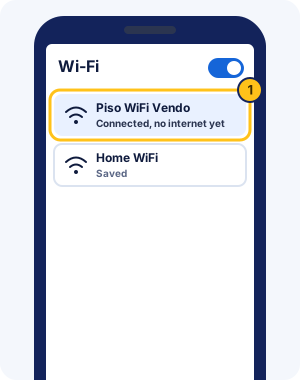
You're not connected to the vendo WiFi
The portal lives on the vendo, so it only opens while you're connected to that vendo's WiFi. Open WiFi settings and check that the vendo's network says Connected. "No internet" under it is normal before you pay.
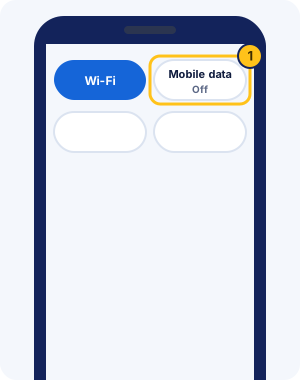
Mobile data is on
With mobile data on, Android can switch away from a WiFi network that has no internet yet. Your request for 10.0.0.1 then goes out over mobile data and finds nothing. Turn mobile data off in quick settings, open the portal, and switch data back on later if you need it.
The address is mistyped
A space, a missing dot or an extra zero makes the browser search the web instead of opening the portal. Type http://10.0.0.1 exactly, or paste your attempt into the 10.0.0.1 address checker.
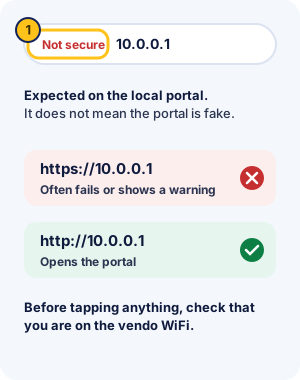
The browser switched to https
The portal answers plain http, so an https address often fails or shows a warning. Type the address with http:// in front. Chrome may then say "Connection is not secure" or show "Not secure". On a local portal at 10.0.0.1 that's expected and doesn't mean the portal is fake. Still, check that you're on the vendo WiFi before you tap anything.
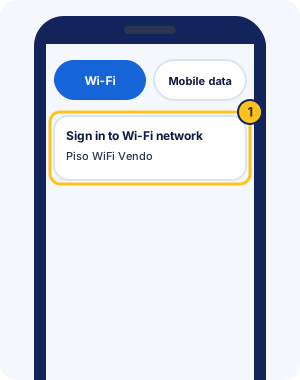
The sign-in screen was closed
Phones open the portal by themselves when you join a network that needs a login. On Android, tap the "Sign in to Wi-Fi network" notification. On iPhone, the login screen appears after you join. Closing it with "Without Internet" also turns off Auto-Login for that network; switch Auto-Login off and rejoin to see the screen again.
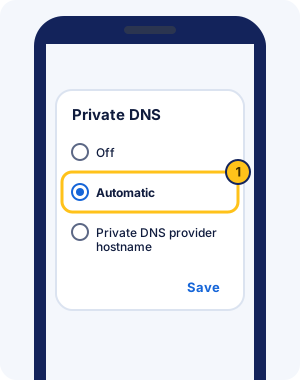
Private DNS is set to a provider hostname
A custom Private DNS server on Android can stop the redirect to the portal. Android may also mark the WiFi as having no internet when it can't reach that server. Go to Settings > Network & internet > Private DNS, pick Automatic, and tap Save. Automatic is Android's default.
WiFi is stuck on "Obtaining IP address"
"Obtaining IP address" means your phone is waiting for the vendo to give it a network address. Forget the network, turn WiFi off and on, and join again from closer to the vendo. If the message keeps looping, the vendo may be busy or restarting, and only the owner can fix that.
Nothing above worked
Try a different browser, then restart WiFi. If the portal still won't load, the vendo may be off or restarting. It may also use a different address, such as 10.5.50.1 on many MikroTik-based vendos. The owner can tell you which.
Paused time problems and what to do
Most paused-time problems come from the owner's settings or from the vendo seeing your phone as new. Each case below has its own fix.
Your time expired while paused
Paused time can still expire. AdoPiSoft owners set an expiry for each session, PisoFi owners set how long paused time stays valid, and JuanFi supports pause expiration. In AdoPiSoft's example, 2 hours of time expires 3 hours after it starts. Ask the owner how long a pause lasts before you leave for long.
The vendo restarted or lost power while you were paused
What happens to paused time after a brownout depends on the system. LPB stores session time in its cloud rather than only on the machine; other systems don't document what happens. Open the portal once the vendo is back, check your time, and show the owner if it's missing.
Pause disappeared in the middle of a session
Pause usually disappears because you've used every pause the owner allows; on AdoPiSoft the count beside the button shows how many are left. It can also vanish when voucher time can't pause or the owner changes a setting. Reload the portal first.
You want to resume on a different phone
Time is usually tied to the phone that paid, because the vendo recognises its WiFi address. AdoPiSoft's default portal can give you a passcode that links your sessions across devices, and LPB syncs time between its own vendos. Otherwise, ask the owner to move your time.
Piso WiFi pause not working
If the portal opens but pausing fails, the owner's settings are the usual reason. Pausing may be off, your pauses may be used up, or your voucher time can't pause. On AdoPiSoft's default portal the Pause button disappears when pausing isn't allowed, and PisoFi owners can cap how long you stay paused. The Pause button guide covers each case.
Lost your time after reconnecting? Vendos often recognise you by your phone's WiFi address, and phones use private addresses that can change. On iPhone, the Rotating setting changes the address about every two weeks on open networks; setting that network to Fixed keeps it steady. Android keeps one randomized address per network unless you change the setting.
Piso WiFi not working FAQ
Why can't I pause my Piso WiFi?
Usually the owner turned pausing off, your pauses ran out, or you're on voucher time that can't pause. If the portal itself won't load, fix that first with the checks above. The missing Pause button causes are listed on the pause guide.
How do I fix "Obtaining IP address" on Piso WiFi?
Forget the network, turn WiFi off and on, and join again closer to the vendo. The message means your phone is waiting for the vendo to hand it an address. If it never arrives, the vendo may be busy or restarting.
Why does Piso WiFi say connected but no internet?
Before you pay or while you're paused, a vendo gives you WiFi without internet, so "No internet" is normal. Open http://10.0.0.1, then insert a coin or tap Resume.
Why did my time disappear after I reconnected?
Your phone may have joined with a new private WiFi address, so the vendo saw a new device. On open networks, iPhone uses a Rotating private address by default that changes about every two weeks. Ask the owner to check your old session, and on iPhone set that network's Private Wi-Fi Address to Fixed.
How do I fix Piso WiFi not connecting?
Forget the network, turn WiFi off and on, and rejoin closer to the vendo. If it still won't connect, the vendo may be full, off or restarting; ask the owner.
Why can't I connect to the Piso WiFi portal?
Usually your phone is on mobile data, on another WiFi network, or the browser switched to https. Start with the troubleshooter at the top of this guide; it checks each cause in order.
Why is Piso WiFi so slow?
Everyone on the vendo shares the owner's internet line, so speed drops when many people connect. Owners can also cap each user's speed; AdoPiSoft sets it per user in its Bandwidth Limiter.
Why won't the vendo accept my coin?
The vendo may be offline. AdoPiSoft vendos with Online Status Checking stop taking coins while the internet is down. Bent or foreign coins also get rejected, so try another coin, then ask the owner.
Why does Piso WiFi keep disconnecting?
Weak signal is the usual cause, so move closer to the access point. Android may also switch to mobile data when the WiFi has no internet. Turn mobile data off and rejoin the vendo network.
What should I tell the owner when it's not working?
Say when you paid, how much, and what the portal shows now. Mention your phone model too. That helps the owner find your session on the admin page.