TP-Link makes the hardware, not the Piso WiFi software
TP-Link makes routers and access points, the boxes that send out the WiFi signal. A Piso WiFi vendo pairs one of them with a small computer running vendo software, and that software draws the portal you pause on.
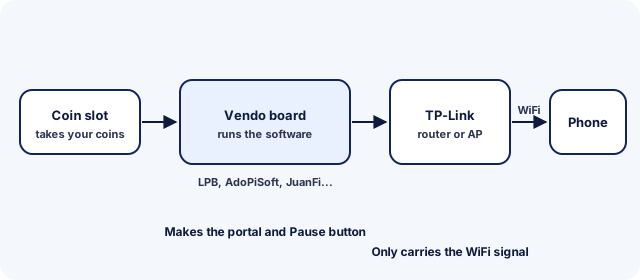
Vendo software makers list TP-Link among the access points their systems work with; AdoPiSoft, for example, names Comfast, TP-Link and Tenda. So "TP-Link Piso WiFi" tells you which brand carries the signal, not which system runs the portal.
How to pause Piso WiFi time on a TP-Link vendo
To pause Piso WiFi time on a TP-Link vendo, join its WiFi, open http://10.0.0.1 and tap Pause, exactly as on any other vendo.
- Connect to the vendo's network, even if its name contains TP-Link.
- Open
http://10.0.0.1, or tap the sign-in notification. - Tap Pause. Its label depends on the software, such as Pause, Pause Time or PAUSE TIME.
For illustrated steps, follow the general pause guide. To find which software your TP-Link vendo runs, use the picker below.
A TP-Link name in your WiFi list
A TP-Link name in your WiFi list usually means the owner kept the router's own network name rather than renaming it. It's still the vendo's network if it's the one near the machine.
Not sure which network is the vendo? Ask the owner, or look for the name printed on the machine.
tplinkwifi.net and 192.168.0.1 are TP-Link's settings, not the portal
TP-Link's own router login is at tplinkwifi.net or 192.168.0.1, and 192.168.1.1 on some models, according to TP-Link's support pages. That page changes the router's WiFi settings; it doesn't show your time or pause it.
Customers never need it. Owners who want the vendo's own settings, such as pause limits and rates, need the software's admin page. The guide to the vendo admin page explains it.
TP-Link router default login
TP-Link's support FAQ says newer routers ask you to create an admin password on first login. Older models use the default below.
| System | Where | Username | Password |
|---|---|---|---|
| TP-Link | tplinkwifi.net | admin | adminSource: tp-link.com. Older models only. Newer models ask you to create a password on first login. |
Change it once you're in, because anyone near the vendo can reach the router's login page. This login changes the router only; it doesn't open the vendo software.
Which Piso WiFi system is your vendo on?
Open the portal and look for these clues:
- The browser bar shows 10.5.50.1, or the page says JuanFi: JuanFi pause steps
- The browser bar shows 10.5.50.1 and the page does not say JuanFi: MikroTik hotspot guide
- The Pause button shows a count in brackets, such as (10x): AdoPiSoft pause steps
- The "Powered by" line at the bottom says LPB: LPB pause and resume steps
- The "Powered by" line says PisoFi: PisoFi guide
- None of these, or not sure: General pause steps
TP-Link Piso WiFi FAQ
Is 10.0 0.0 1 the TP-Link pause address?
No, it's a mistyped 10.0.0.1 with a space and an extra 0. Type http://10.0.0.1 with three dots, and the vendo's portal opens, whatever brand of router carries the WiFi.
Does TP-Link make Piso WiFi software?
No. TP-Link's routers and access points carry the WiFi signal. The portal, coins and Pause button come from vendo software such as LPB, AdoPiSoft or JuanFi.
What does 2.4 GHz mean in a TP-Link Piso WiFi name?
2.4 GHz is one of the two WiFi bands, and some network names include it. It reaches further through walls than 5 GHz, which helps when the vendo is across the street. Connect to it as normal.
Why doesn't tplinkwifi.net show my Piso WiFi time?
tplinkwifi.net opens the router's own settings, not the vendo portal. Your time is on the portal at http://10.0.0.1.
Which TP-Link Piso WiFi network should I join?
Join the network the owner names on the machine or a sign. If you see a TP-Link name and nothing else nearby, it's likely the vendo; ask the owner if you're unsure.
Which TP-Link access point works with Piso WiFi software?
It depends on the software. AdoPiSoft's access point guide lists the TP-Link EAP110 as tested for its VLAN setup. Check your own software maker's list before you buy.
Can a TP-Link access point make the vendo WiFi reach further?
Yes, if the vendo software supports extra access points. AdoPiSoft connects them through a VLAN or a USB-to-LAN setup. The WiFi range guide for owners covers placement.
What if I forgot my TP-Link router password?
TP-Link says a forgotten router login needs a reset to factory defaults. That resets the router's WiFi settings, so note them first and set them up again afterwards.
Does a TP-Link vendo use 10.0.0.1?
The portal address comes from the vendo software, and most use 10.0.0.1. TP-Link's own router settings sit at tplinkwifi.net or 192.168.0.1 instead.
How do I log in to TP-Link Piso WiFi?
Open the vendo's portal at http://10.0.0.1 while connected; that's where you insert coins and pause. TP-Link's own login only changes the router's settings.